
AutoCAD Mac 2015 comes closer to matching Windows
The takeaway
AutoCAD for the Mac is a vanity product, only suitable for Mac users whose buying decisions are based on logos. There are much more mature CAD products available.
Our opinion
For many years, if you wanted to do drafting on the Mac, you had many choices but AutoCAD was not one of them. It is nice that the market leader has seen fit to again support Mac, and is making annual updates. But Autodesk will never be the leader in Mac-based CAD; that battle was waged and lost 15 years ago.
For companies that won’t take an objective look at what is on the market, AutoCAD for Mac will do just fine. But there are other, more mature CAD products for Mac on the market from a variety of vendors.
The details
Autodesk has updated AutoCAD for Mac and AutoCAD LT for Mac, bringing the Mac versions closer to matching the feature set of AutoCAD for Windows. In this case, close is relative: the new features in AutoCAD Mac 2015 means a bit more than half of the features Autodesk considers important are now included.
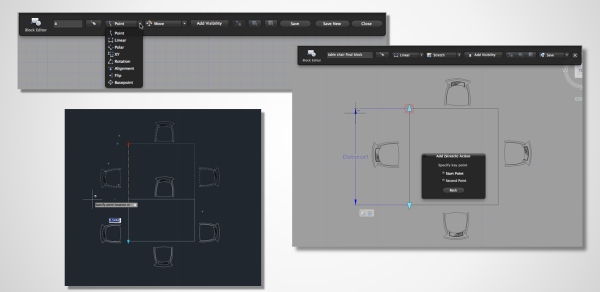
Making and editing dynamic blocks is new in AutoCAD 2015. (Source: Business Wire)
According to Autodesk, key features added in this release include:
Dynamic Blocks: Mac users can now create and edit Dynamic Blocks, which can change shape, size, or configuration as needed; static blocks were already available in the Mac version.
Layer States: Mac users can now save their layer settings as Layer States, which store information like color, linetype, and information about whether a layer is turned off, frozen, or locked.
Data Linking: This feature allows Microsoft Excel table data to be listed in a drawing; the table will automatically update as external changes are made.
Quick Select: Users can use query criteria when looking for objects. The Preview feature in AutoCAD for Windows is also enabled.
What’s not there yet? According to Autodesk, features not yet enabled include:
User Interaction: 8 of 31 features including quick properties palette; AutoCorrect command entry; and new layer notification.
Documentation: 12 of 22 features including table style editing; hatch creation preview; geographic location; multiline style creation; and mtext match properties.
Design: 7 of 16 features including material creation editing, and mapping; walkthroughs, flybys, and animations; 3D orbit target; and camera creation.
Connectivity: 15 of 27 features including DWF underlays; data extraction; hyperlinks; SketchUp import; and design feed.
Customization: 18 of 25 features including VBA; .NET; custom dictionaries; workspaces; and CAD standards tools.
Autodesk has hit 100% when licensing features are compared between Mac and Windows: stand-alone licensing, network licensing, cross-platform licensing, and online license transfer utility are available on both platforms.